How to compare disk usage snapshots on Mac
Compare adjacent metadata scans of the same stable scope to locate where storage changed without claiming which app caused it.
Direct answer
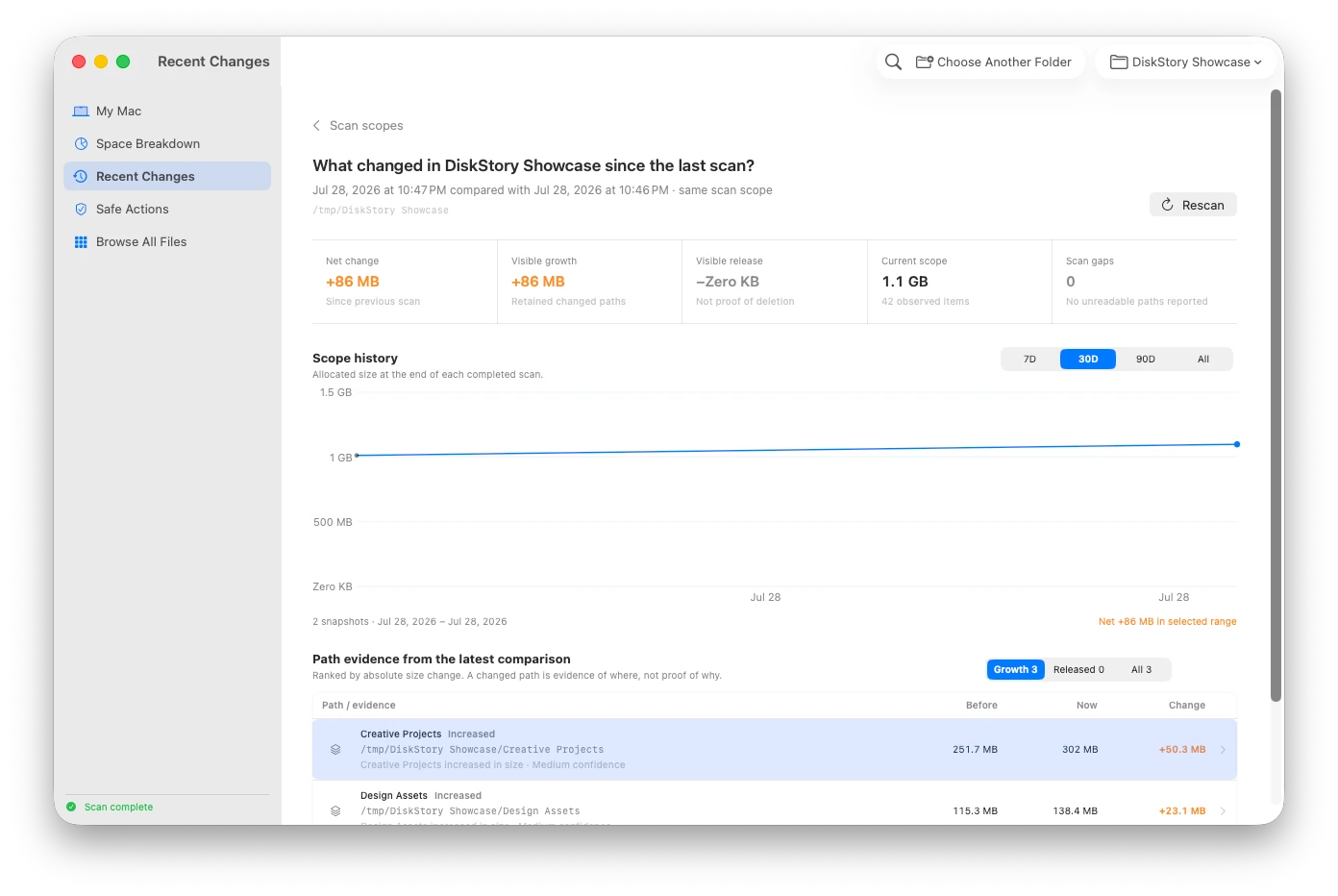
A useful disk-usage comparison keeps the scan scope identical, compares adjacent completed scans, and shows before, now, delta, time, path, and coverage gaps together. DiskStory scan snapshots are local metadata records; they are not APFS volume snapshots and do not preserve file contents.
When this guide applies
- Available storage dropped and you need to find which retained paths grew between two scans.
- A developer, media, download, or application-data folder changes repeatedly and one current total is not enough.
- You want evidence of where change appeared without treating a path match as proof of user or application behavior.
Step-by-step review
Choose one stable scope
Use the same startup-disk or selected-folder identity. Never combine totals from overlapping or different roots.
Complete a baseline scan
Let the scan finish and review its unreadable count and retained boundary before using it as evidence.
Repeat the same scope later
Create the next completed local metadata snapshot after normal work, an installation, a build, or another event you want to investigate.
Compare adjacent snapshots
Read before, now, signed delta, timestamp, path, and scan gaps in one view. Rank changes by magnitude without hiding decreases.
Confirm the path in the live browser
Rescan historical scopes before opening them as current evidence, and inspect the item’s present identity before taking any action.
Technical context
DiskStory snapshots are not APFS snapshots
They are bounded local records of observed file metadata. They cannot restore a volume, preserve file contents, or replace Time Machine or an APFS snapshot.
Scope identity comes before arithmetic
A comparison is valid only when both scans describe the same stable root. A renamed root can continue history only when its stable identity still matches.
Path correlation is not causation
A changed Xcode, Downloads, Docker, or cache path is evidence of where the delta appeared. It does not by itself prove which process or person caused it.
Evidence to keep in one comparison
| Evidence | What it answers | Important limit |
|---|---|---|
| Before / now | How much observed allocation the retained path had in each scan. | Only comparable inside the same stable scope. |
| Signed delta | Whether observed allocation grew or shrank, and by how much. | A delta is not guaranteed reclaimable space. |
| Path and identity | Where the change appeared and whether a retained item moved. | A matching path or identity does not establish a cause. |
| Coverage gaps | Whether permissions or scan boundaries changed between observations. | A cleaner result may reflect missing evidence rather than less data. |
Risks and actions to avoid
Different scopes produce false stories
Adding, subtracting, or charting different or overlapping roots can double-count data or assign a change to the wrong boundary.
Incomplete scans should not become baselines
Cancellation, errors, or materially different access coverage can make a comparison misleading.
Historical evidence can be stale
A retained path may have moved, changed identity, or disappeared; current action requires a fresh scan and revalidation.
What the Omuuz product can—and cannot—do
What it can do
DiskStory can retain bounded local metadata snapshots per stable scope, compare adjacent completed scans, rank path-level deltas, preserve coverage gaps, and identify some moves using stable file identity.
What it cannot do
DiskStory cannot create or restore APFS snapshots, preserve file contents, combine overlapping scopes, or prove that an application caused a change.
Product evidence