How to diagnose a failed cron job or systemd timer
Start from the scheduler's own evidence, separate a proven failure from missing cron history, and check the business outcome before deciding what to fix.
Direct answer
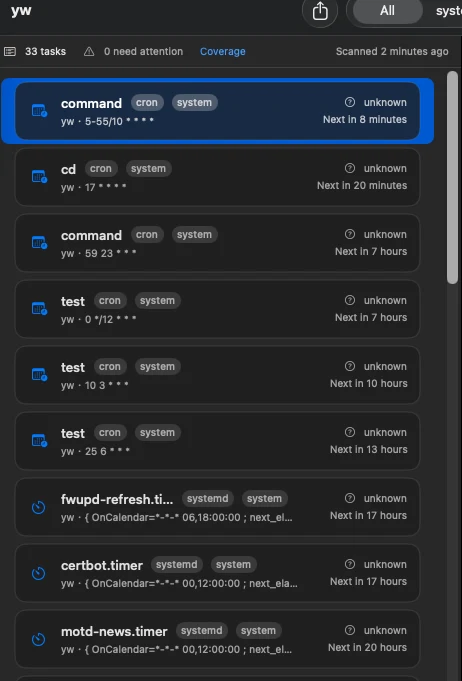
For a systemd timer, inspect the timer's last and next trigger, the linked service result, exit status, and bounded journal lines as one evidence chain. For cron, first confirm the definition and predicted schedule, then use an attributable log or an explicit success check such as a backup artifact, certificate expiry, heartbeat file, or HTTPS health endpoint. If cron exposes no reliable per-job result, keep the status Unknown instead of treating silence as success.
When this guide applies
- A backup, certificate-renewal, reporting, or business script may have stopped working.
- A systemd timer is overdue or its service reports a non-zero exit status.
- A cron definition exists, but the server does not expose a trustworthy per-job result.
Step-by-step review
Confirm the task identity
Match the scheduler source, owner, command or unit, and host before using any result as evidence.
Check the schedule
Review the last trigger and next run for systemd, or the clearly labeled prediction for supported cron syntax.
Inspect native execution evidence
For systemd, read the linked service result, exit code or signal, and a bounded journal sample.
Verify the business outcome
Use a configured artifact, certificate, heartbeat, or HTTPS check to confirm whether the task achieved its purpose.
Act from the runbook
Use the task note and runbook to investigate safely; JobLens remains read-only and does not rerun or edit the task.
Technical context
Systemd connects scheduler and service evidence
A timer records scheduling facts while its linked service records execution facts. Reading only one side can hide the actual failure.
Traditional cron often lacks a durable result
A crontab proves intent to schedule, not that the command ran successfully. Per-job exit history exists only when another attributable system records it.
Outcome checks close the evidence gap
A fresh backup artifact, renewed certificate, updated heartbeat, or healthy endpoint can prove the result users care about even when scheduler evidence is incomplete.
Recovery is intentionally user-controlled
JobLens explains evidence and keeps task-specific notes and runbooks, but it does not use sudo, edit definitions, or execute a recovery command.
Risks and actions to avoid
Unknown is not success
Missing cron evidence must not be converted into a green state.
Logs can be shared
A system or application log is useful only when its lines can be attributed to the selected task and time window.
A successful process can still miss the outcome
Exit code zero does not prove that a backup is usable or a certificate was renewed; verify the business artifact.
What the Omuuz product can—and cannot—do
What it can do
JobLens can inventory supported systemd and cron sources, connect available run evidence, evaluate configured success checks, retain local change history, and point to a user-authored runbook.
What it cannot do
JobLens cannot manufacture missing cron exit history, guarantee attribution from a shared log, monitor while the Mac is off, or edit, restart, enable, disable, or rerun a remote task.
Product evidence