

AppUnlink Product tour
Real English-interface screenshots from the current product repository, shown with privacy-safe sample data.


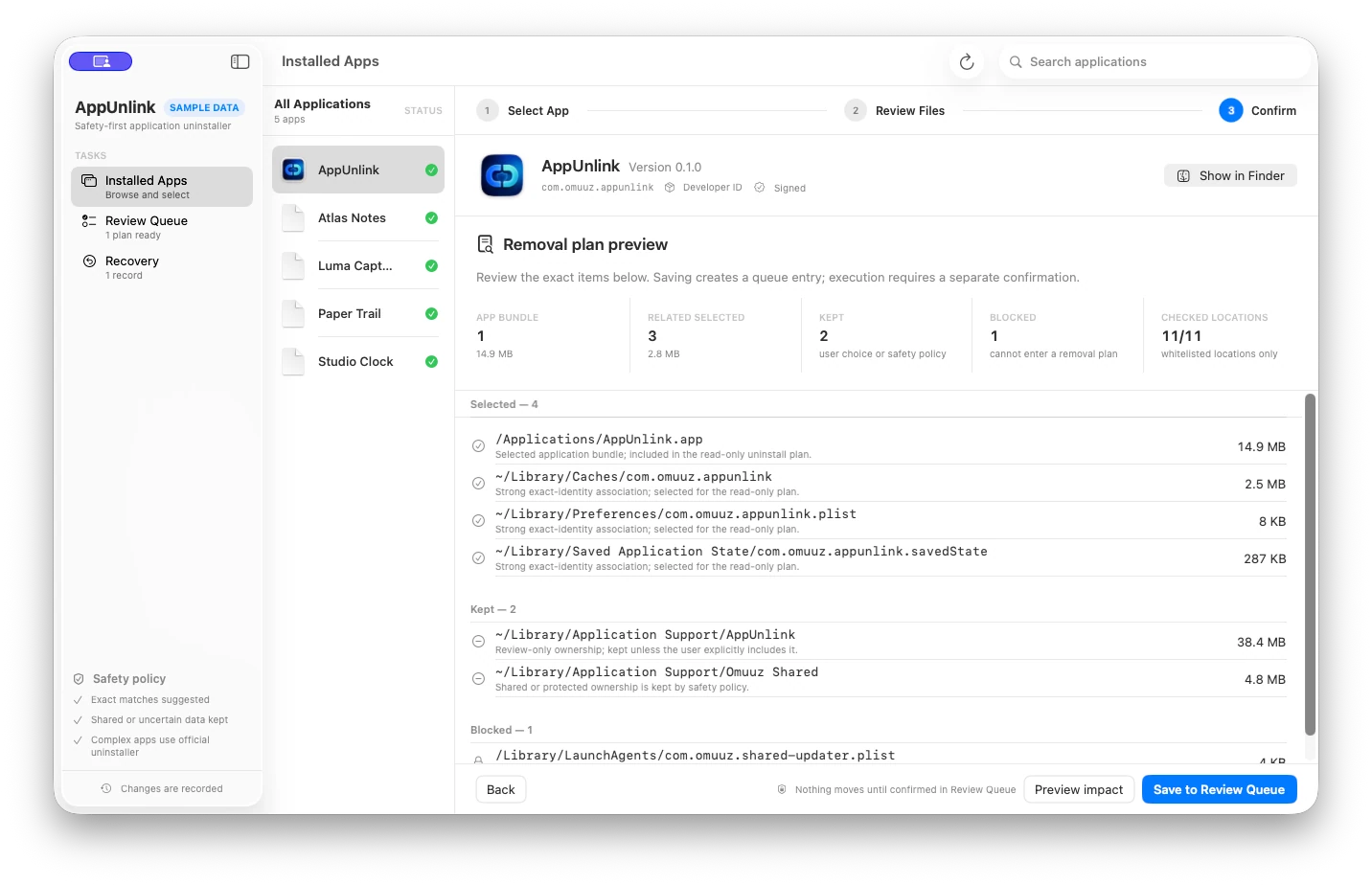
Product facts
- Native macOS app — SwiftUI desktop app requiring macOS 14+
- Explainable evidence — Bundle ID, signature, Team ID, components, and known consumers
- Trash-first actions — Reviewed related items move first; the app bundle moves last
- Local records — No upload or telemetry client; review and recovery records stay on the Mac
How it works
- Choose an installed app — Start with a top-level app discovered in Applications, Utilities, or your user Applications folder.
- Inspect evidence — Review identity, exact Bundle ID paths, name-only matches, App Groups, background configuration, and scan coverage.
- Preview impact — Confirm suggested exclusive items, keep shared or protected data, and explicitly review any eligible uncertain item.
- Save a review plan — Record app identity, scan coverage, per-item decisions, selection source, and a revision without moving a file.
- Confirm and execute — Reverify the app and every selected item, then move related items to system Trash before the app bundle.
- Review or restore — Inspect moved, skipped, and failed outcomes; restore recorded Trash items when the original path is available.
What it does—and does not do
- Release candidate
- Version 0.3.8 is Developer ID signed, notarized, and packaged for direct distribution
- App discovery
- Top-level apps in three standard application directories
- Relationship scan
- Explicit user Library and limited system-component locations
- Content boundary
- Reads app metadata and limited configuration plists—not personal document contents
- Ownership policy
- Shared, protected, blocked, and symbolic-link items cannot enter standard execution
- Standard action
- Eligible reviewed items move to system Trash; no permanent deletion or Trash emptying
- Complex apps
- System Extensions, LaunchDaemons, or privileged helpers require the vendor uninstaller
- Recovery
- Conditional on the recorded Trash item still existing and the original path being free
- Full Disk Access
- No reliable probe or claim of whole-disk or administrator-level cleanup
- Network and privacy
- No cloud sync, telemetry, or scan upload; activation and private updates use the Omuuz product service
AppUnlink Product guides
How AppUnlink matches files to an applicationHow to Uninstall Apps on Mac and Check LeftoversQuestions answered from the product specification
What is AppUnlink?
AppUnlink is an evidence-first macOS app uninstaller. It distinguishes exclusive, shared, uncertain, and protected data, then moves eligible items to system Trash only after review.
Does AppUnlink scan every location on the Mac?
No. It discovers top-level apps in three standard application directories and scans an explicit set of user Library and system-component locations. Coverage results are visible, but this is not a whole-disk scan.
How does AppUnlink decide that a file belongs to an app?
It prioritizes exact Bundle IDs, signing and Team IDs, entitlements, embedded components, background configuration, and known consumer relationships. A matching display name alone remains uncertain evidence.
Does AppUnlink read my documents, photos, or mail?
It does not read those personal contents to make uninstall decisions. It does read app metadata, code-signing information, file resource properties, and limited configuration plists needed to understand background relationships.
Are scan or recovery records uploaded?
Not in the current implementation. There is no upload, telemetry, or account client. Review plans, full paths, Trash targets, and recovery outcomes stay in Application Support on the current Mac.
Does AppUnlink automatically remove everything it finds?
No. Exact exclusive items are suggestions and can be deselected. Uncertain items stay kept unless you accept an explicit review warning. Shared, protected, blocked, and symbolic-link items cannot enter standard execution.
Does confidence mean an item is safe to remove?
No. Confidence explains evidence strength and safety context; it is not deletion permission. Ownership policy, app complexity, scan coverage, and explicit confirmation still control execution.
Does AppUnlink permanently delete files?
No. The standard flow uses system Trash and never empties it. Items in Trash usually continue to occupy disk space.
What happens if the target app is running?
Execution is blocked. AppUnlink can send a normal quit request and recheck; it does not force-quit the app or stop third-party background services.
Why does AppUnlink move the app bundle last?
Related items move first so a partial failure leaves the selected app installed. If a related-item move fails, AppUnlink does not move the app bundle and records the outcome for review.
Can I restore items moved to Trash?
You can try while the recorded Trash item still exists, the original path is free, and permissions allow the move. AppUnlink never overwrites an occupied original path.
Why do some apps require an official uninstaller?
System Extensions, LaunchDaemons, and privileged helpers cannot be handled safely by generic file moves. AppUnlink blocks the standard flow and opens a trusted uninstaller app or reveals a vendor tool in Finder.
Does AppUnlink run vendor uninstall scripts or executables?
No script or executable is run automatically. A trusted uninstaller app may be opened only after an explicit click; other vendor tools are revealed in Finder for the user to inspect.
Does AppUnlink require Full Disk Access or administrator privileges?
The basic scan uses existing user permissions and reports inaccessible locations. The current build has no reliable Full Disk Access probe or executable privileged helper, so it does not claim complete-disk or administrator-level cleanup.
Is the app UI available in Chinese?
Not currently. The app interface is English only; Chinese storefront copy does not imply completed app localization.
Does AppUnlink support Apple silicon and Intel Macs?
The source builds as a native macOS app, but no public architecture claim is made until the actual signed and notarized release artifact is inspected.
How much does AppUnlink cost, and can I buy it now?
AppUnlink is available as a one-time $6.99 USD lifetime purchase for up to three Macs. Sign in to Omuuz to purchase it and access the private download.
Fact-check note
Facts are grounded in the AppUnlink product specification and the native app's catalog, identity, candidate scanning, review planning, Trash execution, recovery, privacy, and release boundaries.