MenuVeil Product tour
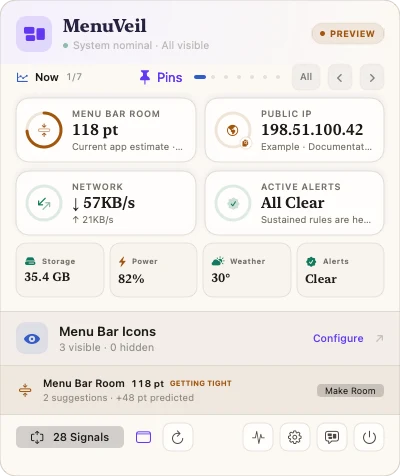
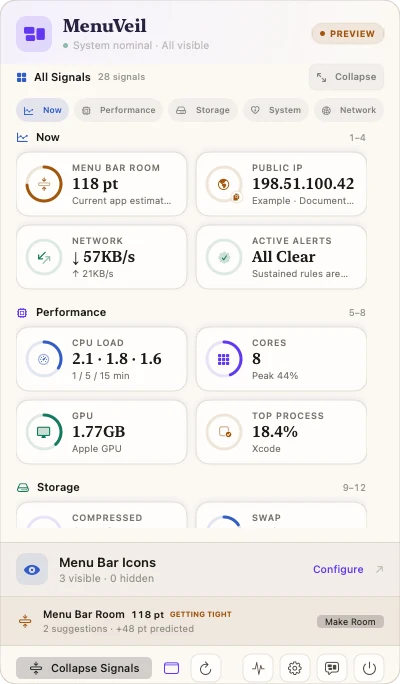
Real English-interface screenshots from the current product repository, shown with privacy-safe sample data.
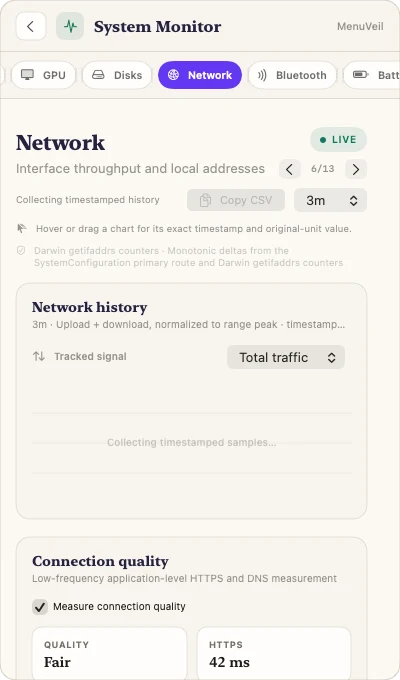
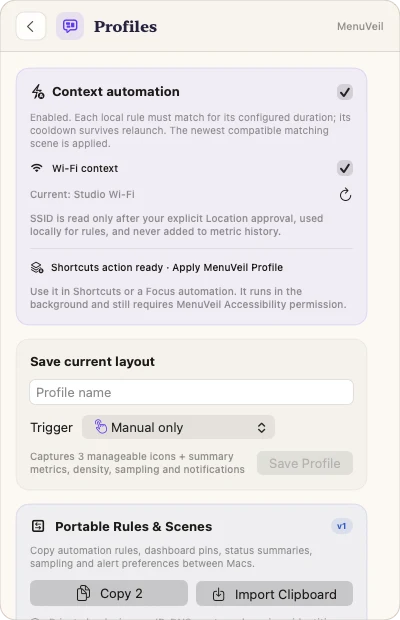
Product facts
- Native status-bar app — SwiftUI and AppKit on macOS 26+
- Signal coverage — 28 dashboard signals across 13 monitor modules
- Menu control — Supported items only, with stable identity, post-check, and rollback
- Local by default — Settings, profiles, and enabled histories stay on this Mac
How it works
- Pin the overview — Choose the four signals that deserve immediate space in the compact shelf.
- Open deeper evidence — Expand all signals or enter one of 13 monitor modules inside the popover.
- Curate eligible icons — Scan stable menu items and choose which supported icons remain visible.
- Save and reapply — Capture a profile, apply it manually or by an explicit rule, and roll back if verification disagrees.
What it does—and does not do
- Compatibility
- macOS 26 or later; the current validation build is Apple silicon.
- Menu control
- Only discovered, supported third-party icons and eligible Apple controls are offered.
- Excluded controls
- System-managed items, privacy indicators, unsupported controls, and MenuVeil itself are not manageable.
- Accessibility
- Required for menu discovery, invocation, and validated Command-drag; not used to read document content or type for you.
- Local records
- Preferences, profiles, bounded histories, alerts, insights, and recovery evidence remain in local app data.
- Optional providers
- Public IP, IP metadata, weather, city search, U.S. severe-weather alerts, and HTTPS quality probes contact external services only when enabled.
- Weather
- Commercial builds use MET Norway forecast data under CC BY 4.0 with visible attribution.
- Availability
- Free 3-day trial, then a $4.99 USD lifetime license for up to three Macs.
MenuVeil Product guides
How to organize Mac menu-bar icons safelyQuestions answered from the product specification
What does MenuVeil do?
MenuVeil combines supported menu-bar icon control, Mac and network monitoring, and reversible layout profiles inside one status-bar command center.
Can MenuVeil hide every menu-bar item?
No. It only offers items that pass discovery, stable-identity, and eligibility checks. System-managed controls, privacy indicators, unsupported items, and MenuVeil itself are excluded.
Why does menu control need Accessibility permission?
macOS Accessibility is required to inspect and invoke eligible menu controls and to perform validated Command-drag operations. MenuVeil does not use it to read document content or type on your behalf.
What can I monitor?
The current client exposes 13 modules covering overview, CPU, GPU, memory, disks, network, Bluetooth, battery and power, sensors, clocks and calendar, weather, processes, and insights, with 28 dashboard signals.
Does detailed monitoring open another window?
No. The overview, all-signals view, monitor pages, profiles, settings, and menu-icon manager are designed to remain in the status-bar command center.
Where is history stored?
Enabled metric, network-identity, quality, insight, and recovery histories use bounded stores in the current user's local app data. They are not uploaded by the current client.
Which features use the network?
Optional public-IP lookup, IP metadata, weather and city search, U.S. severe-weather alerts, and HTTPS quality probes contact external providers. Each corresponding module can be disabled.
Can a permanently offline Mac be revoked?
No. A refund or device deactivation takes effect when that Mac reconnects; a Mac that never reconnects keeps its signed offline entitlement. This is the tradeoff that makes permanent offline use possible.
Does MenuVeil track me?
The current client has no analytics, advertising, or tracking backend. Visual website screenshots use RFC 5737 documentation addresses rather than a user's live public address.
What does Location permission do?
MenuVeil asks for Location only when you enable Wi-Fi context and need the current network name. It does not request coordinates, scan nearby networks, or add the SSID to metric history.
What do Calendar and Bluetooth permissions do?
Calendar reads selected upcoming event fields into memory and never edits events. Bluetooth reads paired-device status without discovering or connecting to devices; device addresses are hashed at the provider boundary.
How do Profiles stay reversible?
A profile captures supported menu-item state and selected summary configuration. Apply uses preflight checks, a captured snapshot, post-operation verification, rollback, and a recovery path if the expected state is not reached.
How does the trial and license work?
MenuVeil is free to use for three days. After the trial, a one-time $4.99 USD lifetime license activates up to three Macs. Initial activation uses a Secure Enclave device proof and a signed receipt; core features remain available offline indefinitely afterward.
Do I need to enter my license again after updating?
No on the same Mac. MenuVeil 0.1.4 securely migrates an active legacy activation to the new device-bound receipt automatically. If the old activation is missing, revoked, or belongs to another Mac, the app asks for the license key.
Fact-check note
Audited against MenuVeil 0.1.4 build 5: the Swift package and AppKit/SwiftUI status-bar implementation, metric registry, menu-control driver and rollback coordinator, privacy descriptions, local stores, profiles, MET Norway weather integration, automatic legacy-license migration, test suites, signed/notarized release artifacts, approved icon master, and deterministic English screenshots.