How to organize Mac menu-bar icons safely
Separate supported third-party icons from macOS-managed controls, then make reversible changes with verification.
Direct answer
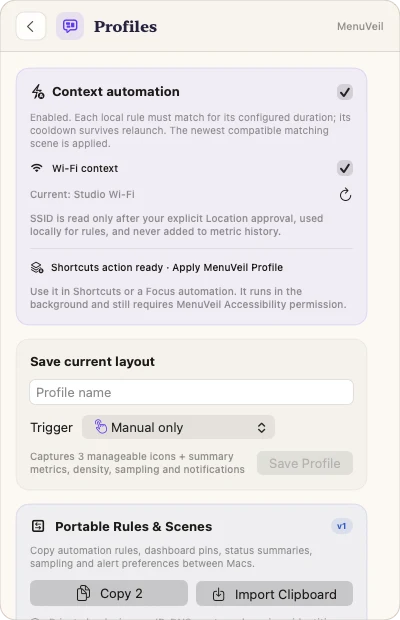
Start by identifying which menu-bar items macOS permits an app to move. MenuVeil omits system-managed controls and privacy indicators, captures the current supported layout, applies only eligible changes, checks the result, and retains a rollback path when verification disagrees.
When this guide applies
- The menu bar is crowded, but you do not want to hide a clock, privacy indicator, or macOS-managed control that cannot be rearranged safely.
- You want different visible icon sets for work, presentation, or travel without rebuilding the layout from memory.
- A previous icon change did not produce the expected result and you need an explicit recovery path.
Step-by-step review
Grant access deliberately
Enable Accessibility only when you want MenuVeil to discover, invoke, or move eligible menu-bar items.
Scan the current menu bar
Let MenuVeil classify stable supported items while omitting its own icon, privacy indicators, and system-managed controls.
Choose the visible set
Review each eligible item and decide what should remain visible; unsupported rows are not presented as controllable.
Capture before applying
Save the supported layout so the previous state remains available if the operation does not verify.
Check the result
Confirm the post-operation state. If it differs from the requested layout, use the captured snapshot and recovery evidence.
Technical context
macOS owns part of the menu bar
Some Apple controls and privacy indicators are system-managed. Their presence does not mean a third-party app can safely hide or rearrange them.
Identity comes before movement
A dynamic title or visual position is not a stable identity. MenuVeil requires bounded discovery evidence before offering a control.
Verification makes profiles reversible
A profile is useful only when applying it checks the resulting state and preserves a way back.
Risks and actions to avoid
Not every icon is manageable
System-managed and unsupported items stay outside MenuVeil's visibility controls.
Accessibility is privileged
Grant it only for menu control; revoke it in System Settings if you no longer use that capability.
External apps can change concurrently
Another app may add, remove, or redraw its status item during an operation, so post-check and rollback remain necessary.
What the Omuuz product can—and cannot—do
What it can do
MenuVeil can discover stable eligible items, invoke supported controls, capture layouts, apply verified changes, and preserve rollback evidence.
What it cannot do
MenuVeil cannot override macOS ownership rules, manage privacy indicators, guarantee control of every third-party icon, or read document content through Accessibility.
Product evidence