

RunOrigin Product tour
Real English-interface screenshots from the current product repository, shown with privacy-safe sample data.
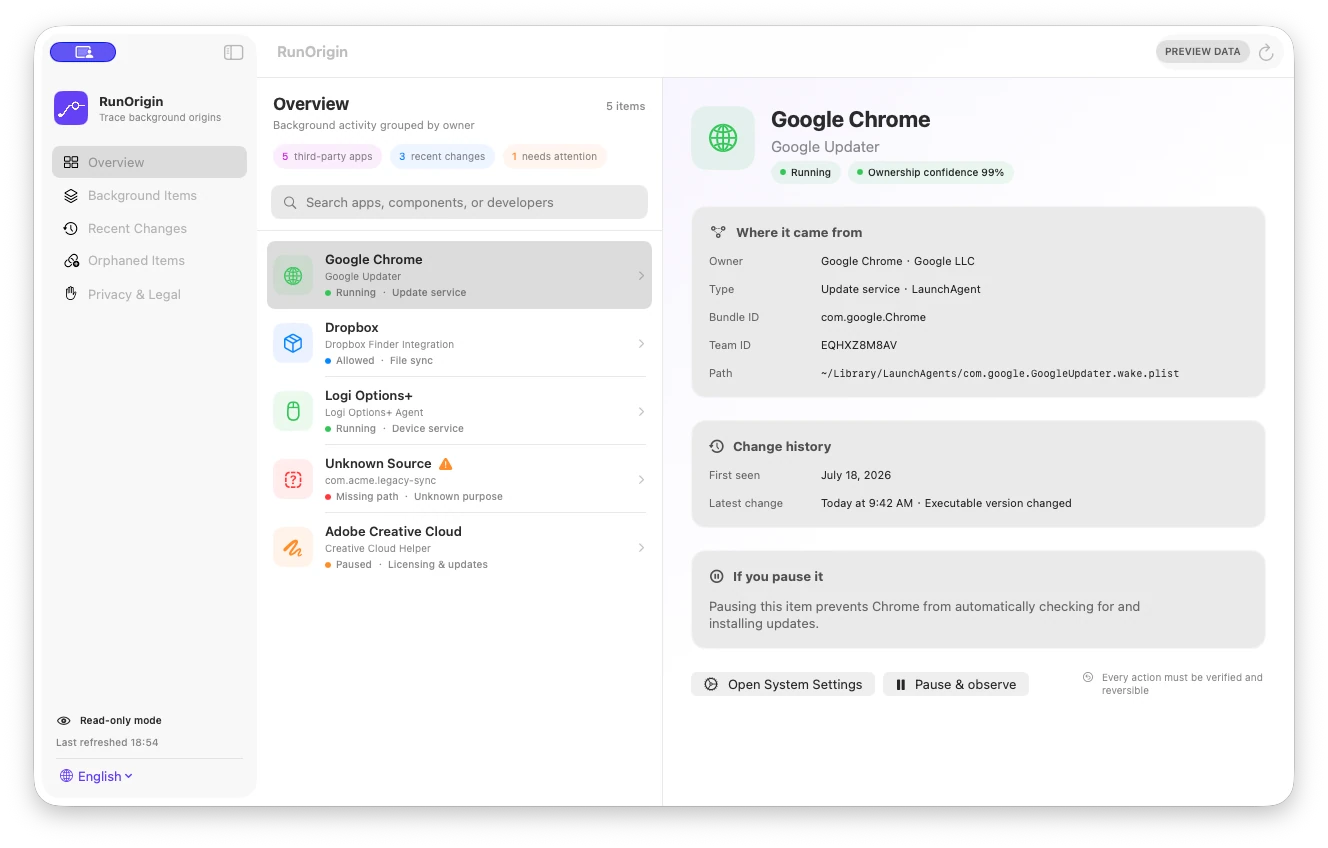


Product facts
- Native read-only inspection — SwiftUI, AppKit, and Security on macOS 13+; no pause, deletion, or root helper
- Defined scan scope — Three standard app roots plus five user, local, and system launchd locations
- Explainable ownership — Confirmed, Likely, or Unknown with path, bundle, signature, and Team ID evidence
- Local, versioned history — Up to 100 snapshots or 90 days; redacted export is user initiated
How it works
- Establish a baseline — Scan configured app roots and five launchd locations, then save the first local JSON snapshot without calling existing items new.
- Choose a view — Switch among Background Owners, Recent Changes, and Unresolved, with an explicit option to include system items.
- Search the evidence — Filter owner, Label, Bundle ID, Team ID, configuration path, executable path, or item type within the current view.
- Inspect the basis — Review ownership level, code-signature evidence, parsed launchd fields, configuration path, and the first declared executable path. RunOrigin does not infer real-time runtime status.
- Rescan and compare — Compare with the adjacent valid snapshot. History is pruned to 100 files or 90 days, whichever limit is reached first.
- Export deliberately — Create a redacted JSON report that replaces the home path with $HOME and omits raw launch arguments; review remaining identifiers before sharing.
What it does—and does not do
- Product identity
- RunOrigin is the published Omuuz product name
- Current availability
- Available as a $5.99 USD one-time lifetime license for up to three Macs
- Coverage
- Five launchd directories; not every macOS background mechanism
- Not covered
- No comprehensive modern Login Items, Background Task Management, System Extensions, or Privileged Helpers
- Read boundary
- Reads app metadata and launchd configuration—not personal document contents
- Configuration parsing
- Keeps selected plist fields and the first declared executable path; raw launch arguments are not retained
- Ownership labels
- Evidence grades, not Apple certification, necessity, safety, or malware verdicts
- Runtime status
- RunOrigin does not infer whether an item is running in real time
- Snapshots
- Local JSON; adjacent valid comparisons, capped at 100 files or 90 days
- Export privacy
- Home paths are redacted and raw launch arguments omitted; app, Label, Bundle ID, and Team ID values can remain identifying
- Actions
- No pause, restore, deletion, plist edits, privileged helper, or arbitrary shell execution
- Network
- Activation, authoritative license status, device deactivation, and licensed updates use remote.omuuz.com; scan records are never uploaded
- Languages
- English is the default interface; Simplified Chinese can be selected
- Distribution evidence
- Version 0.1.1 is an Apple-silicon build signed with Developer ID, notarized and stapled by Apple, with a Sparkle-signed private update
RunOrigin Product guides
How RunOrigin explains a Mac background itemWhat are LaunchAgents and LaunchDaemons on Mac?Questions answered from the product specification
What is RunOrigin?
RunOrigin is a read-only macOS background-item viewer. It scans currently accessible LaunchAgent and LaunchDaemon configuration, groups visible items by likely owner, explains the supporting evidence, and compares versioned local scans.
Can I download or buy RunOrigin now?
Yes. RunOrigin is available as a one-time $5.99 USD lifetime purchase. Sign in to Omuuz to purchase it and access the private first-install DMG.
How many Macs can use one license?
A RunOrigin lifetime license can be activated on up to three Macs owned by the license holder. Devices can be deactivated through the licensing service when moving to another Mac.
Does RunOrigin require an internet connection?
Activation, authoritative license checks, device deactivation, and licensed updates require a connection. After a successful check, the app supports a seven-day offline grace period; scan data remains local.
Does RunOrigin modify background items?
No. It does not pause, restore, delete, edit plist files, install a privileged helper, or execute arbitrary shell commands. It writes only its own snapshots and user-requested exports.
What does RunOrigin read?
It reads app-bundle metadata in three standard roots, selected fields from launchd plists, the first declared executable path, and code-signature evidence. It does not retain raw launch arguments or recursively open personal documents, photos, or mail.
Are scan records uploaded?
No. The network client is limited to license activation, status, device deactivation, and licensed updates. Snapshots stay local; the user controls where an explicitly exported JSON file is shared afterward.
Is an exported report anonymous?
No. Export replaces the current home path with $HOME and omits raw launch arguments, but app names, launchd Labels, Bundle IDs, Team IDs, paths outside the home directory, and coverage errors can remain identifying. Review it before sharing.
Can RunOrigin see every background item on my Mac?
No. The current scanner covers five launchd directories and does not comprehensively cover modern Login Items, Background Task Management, System Extensions, Privileged Helpers, or other persistence mechanisms.
What does scan coverage 5/5 mean?
It means all five target launchd locations produced an accessible result. A missing directory is also recorded as an inspected result. It does not mean every macOS background mechanism was covered.
What do Confirmed, Likely, and Unknown mean?
They are RunOrigin ownership-evidence levels. Confirmed uses stronger rules such as path containment, a unique signature identifier, or system domain. Likely uses weaker evidence such as Bundle ID prefix or shared Team ID. Insufficient evidence remains Unknown. None is a safety verdict.
Is an Unknown item malware?
No. Unknown means the current scan data and rules cannot establish reliable ownership. An item may be legitimate, outdated, associated with an unscanned location, or worth further review. RunOrigin does not currently detect malware.
Does a broken path mean I can delete the item?
Not necessarily. It only means the configured executable path did not exist at scan time. An unmounted volume, permissions, an update in progress, or a path change can affect the result. The current version does not delete configuration.
Does RunOrigin show whether an item is running right now?
No. RunOrigin does not infer real-time runtime status. It explains declared configuration and ownership evidence without presenting an observed process state as authoritative.
Is Configured as Enabled the same as the System Settings switch?
Not necessarily. That label comes only from the plist Disabled field. It is not a complete representation of launchctl, user approval, or modern Background Task Management state.
How does Recent Changes work?
The first scan establishes a baseline. Later scans compare adjacent valid snapshots and can show added, removed, moved, configuration, signature, ownership, and coverage changes. History is capped at 100 files or 90 days; a corrupt latest file is skipped when selecting a valid baseline.
Does RunOrigin monitor continuously?
No. The current version creates snapshots and differences at launch or when the user requests another scan. It has no resident monitoring service.
Which languages are supported?
English is the default interface. Simplified Chinese can be selected from the app.
Does RunOrigin support Apple silicon and Intel Macs?
The current 0.1.1 release supports Apple-silicon Macs. An Intel build is not included in this release.
How is the 0.1.1 release verified?
The distributed arm64 app and DMG passed Developer ID signing, Apple notarization, stapling, and Gatekeeper assessment. The private update ZIP also carries a Sparkle EdDSA signature.
Fact-check note
Audited against RunOrigin 0.1.1, its macOS 13 package manifest, license client, scanner and ownership implementation, snapshot retention, redacted export, signed and notarized release manifest, tests, and the English sample-data screenshot manifest. Screenshot pause controls remain preview UI.