Why a video trim expands to GOP boundaries
Understand why passthrough cuts follow independently decodable sample boundaries instead of arbitrary timestamps.
Direct answer
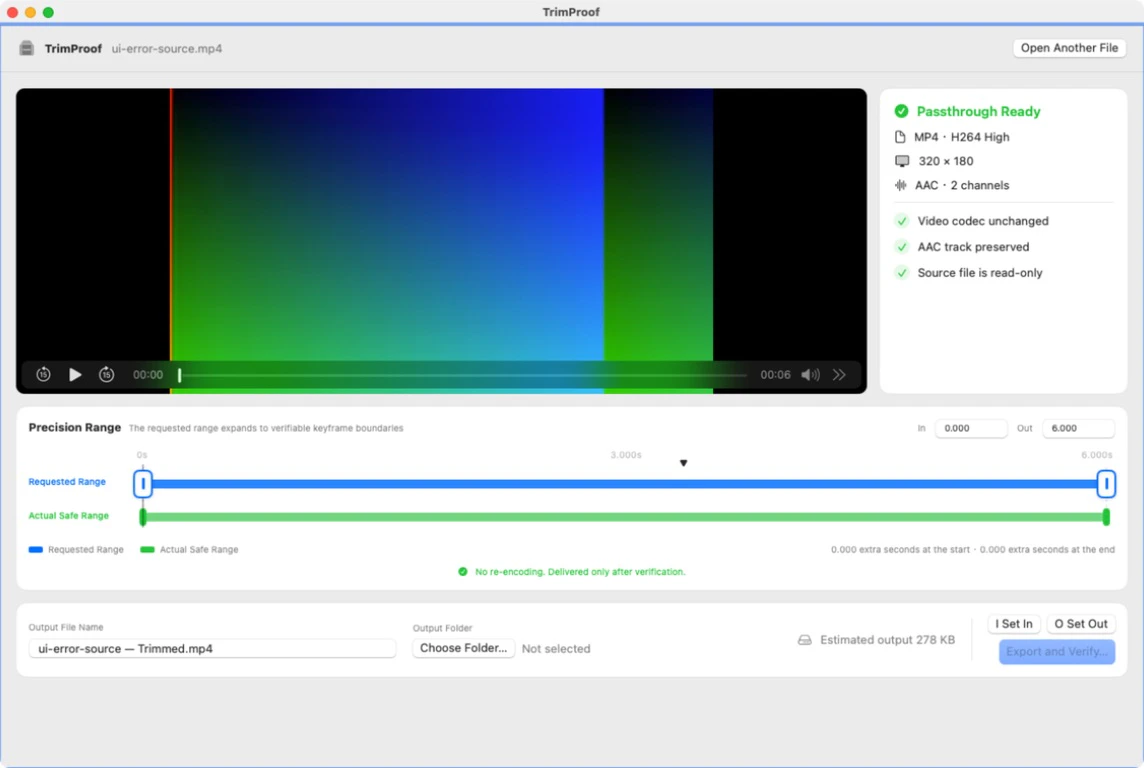
H.264 and HEVC pictures often depend on earlier pictures. To avoid re-encoding, TrimProof expands a requested interval to complete GOP boundaries and shows that safe interval before export.
When this guide applies
- The output begins slightly before the requested in point.
- You must choose between passthrough quality and exact-frame timing.
- You want the real deliverable interval before writing a file.
Step-by-step review
Set the requested interval
Choose the human-intended beginning and ending.
Read the safe interval
TrimProof resolves the enclosing dependency-safe GOP boundaries.
Compare both ranges
Inspect how much the safe result extends.
Adjust deliberately
Move the request if the extra context is unacceptable.
Export after review
Proceed only when the displayed safe interval fits your intent.
Technical context
Independent pictures provide starting points
Dependent pictures may need reference data from an earlier independently decodable sample.
Decode and presentation order differ
A valid trim preserves sample timing and dependencies, not just displayed timestamps.
Visible expansion is evidence
Requested and safe ranges remain separate so the tradeoff is reviewable.
Risks and actions to avoid
Expansion is expected
It is the tradeoff for retaining original compressed samples.
Long GOPs add more context
Independent pictures can be far apart in some sources.
Share the delivered range
Do not promise downstream users only the original requested timestamps.
What the Omuuz product can—and cannot—do
What it can do
TrimProof can calculate and display a full-GOP safe range before passthrough export.
What it cannot do
It cannot make an arbitrary-frame cut while also guaranteeing that video is not re-encoded.
Product evidence